
One frame.
No processing.
An iPhone camera that takes one Bayer RAW frame from one locked physical lens and develops it with Apple's processing switched off — no Smart HDR, no Deep Fusion, no sharpening, no noise reduction.
iOS 18 · iPhone with a Bayer RAW rear camera
Why it exists
Three things people kept saying.
Each one is a feature now.
The stock camera app adds so much post-processing and sharpening that the results look very unnatural. Tonight the light was beautiful — and the 100 mm lens finally had a job to do.
Make it possible to have your own modes — zoom, RAW, exposure — so you don't have to set up every single time.
As a photographer I always shoot in auto and manual, the others I never used. But the user-defined modes I set up for very specific setups, like low light or golden hour.
The shooting screen
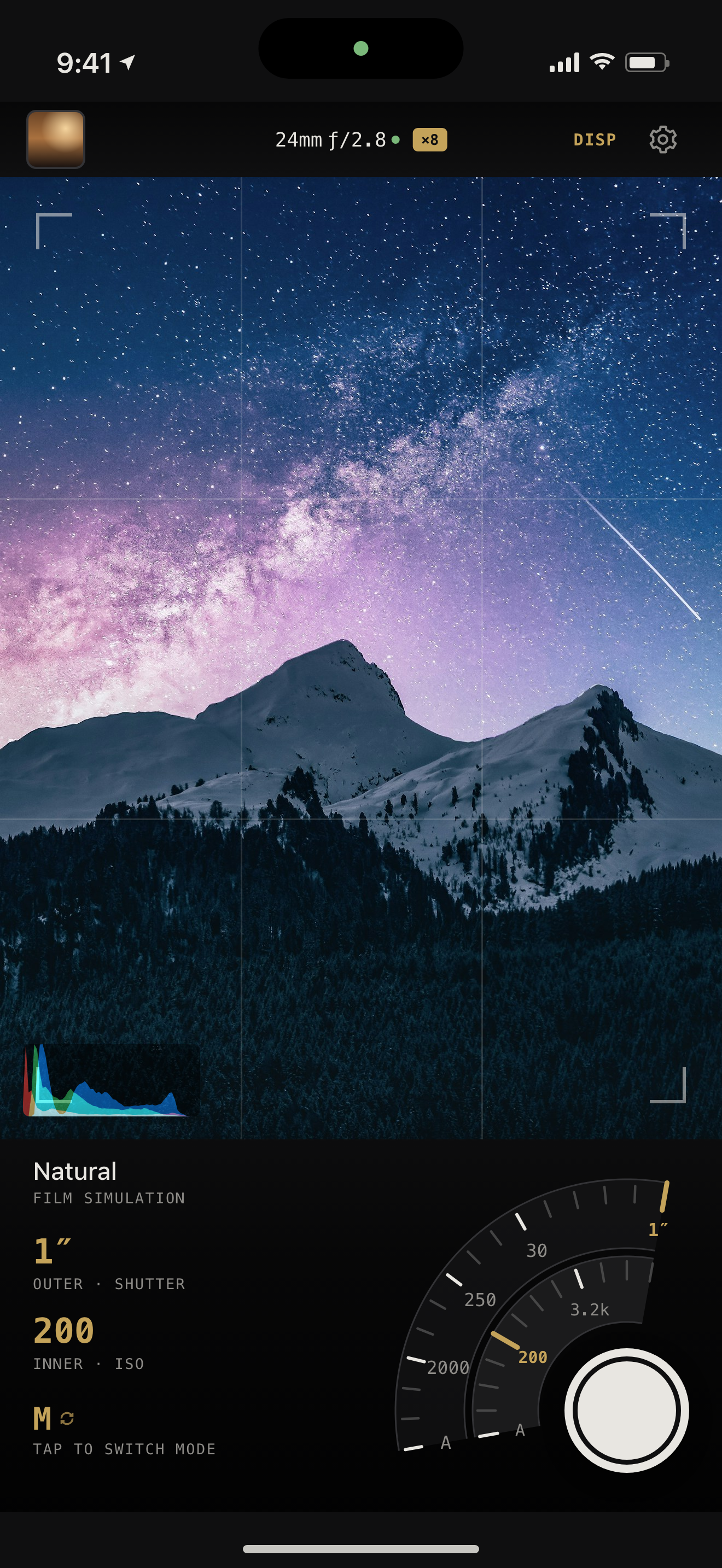
Everything you turn is under your thumb.
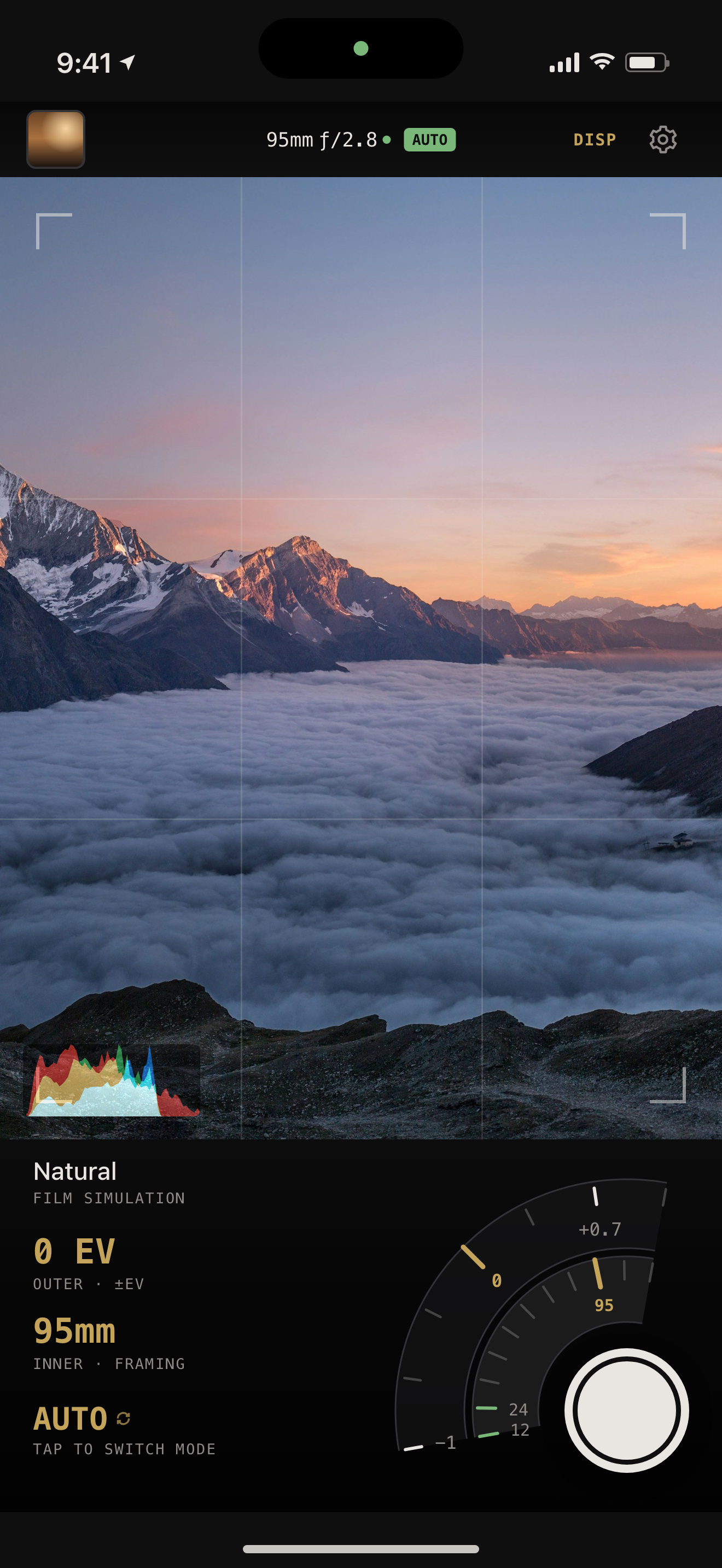
The picture, and one instrument floating over the corner of it that the hand already covers. Two arcs pivot on the shutter button, so a thumb resting there sweeps both ends of a ladder at the same reach.
They change job with the mode
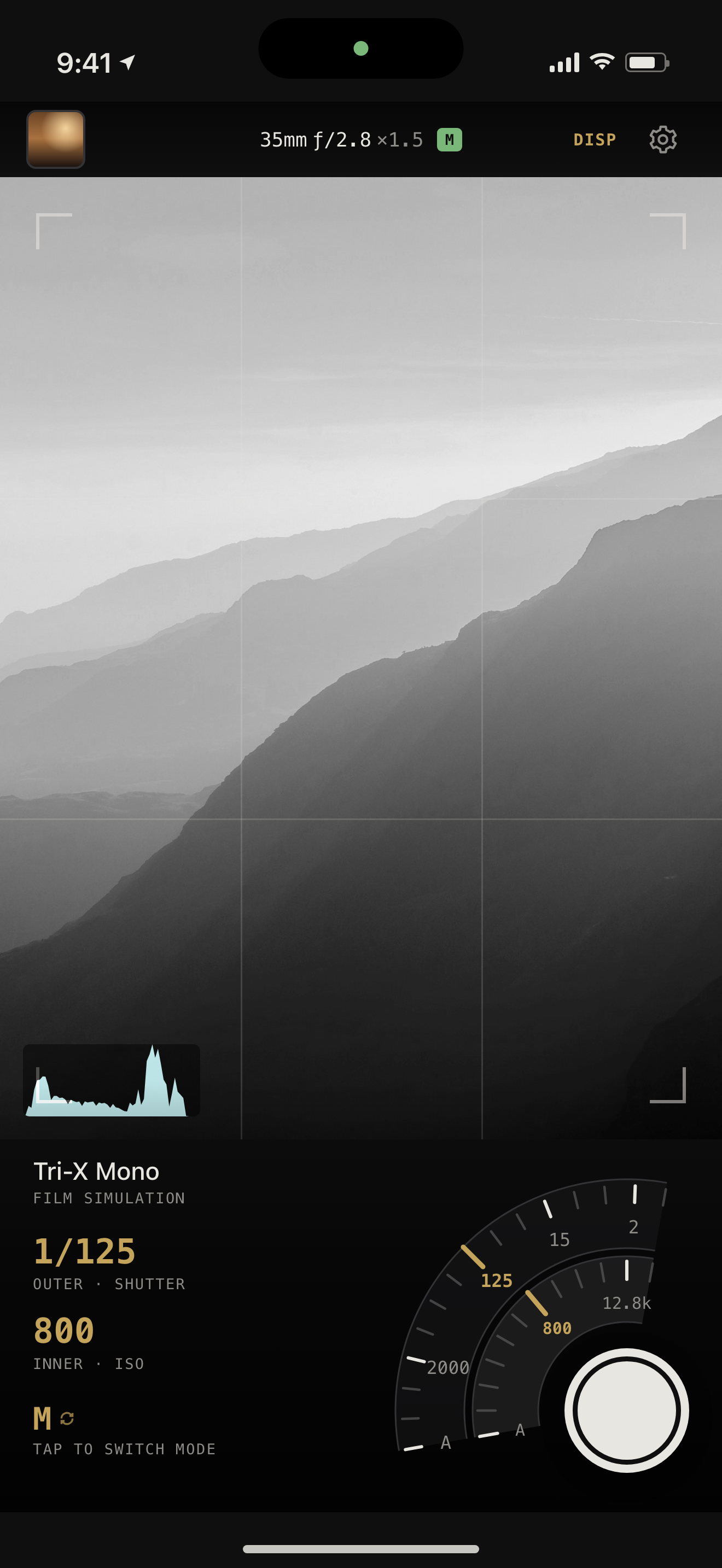
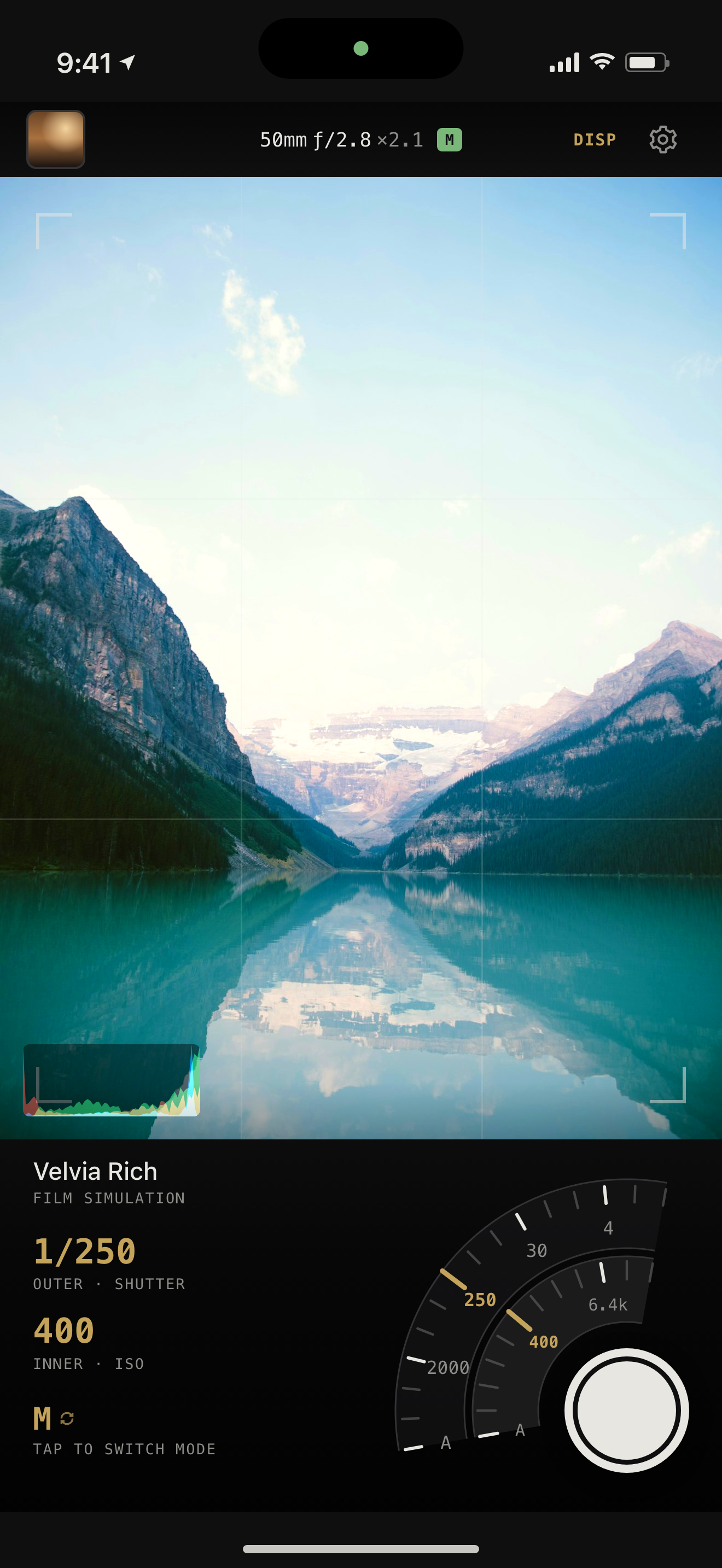
The way a camera's two command wheels do. Framing keeps the inner arc in three of the four positions, because it is the control this camera exists for.
| Mode | Outer arc | Inner arc |
|---|---|---|
| AUTO | ±EV | Framing |
| P | ±EV | Framing |
| S | Shutter | Framing |
| M | Shutter | ISO |
The whole camera mirrors
Arcs, shutter and readings move to the other side. The controls belong under the thumb already holding the phone — and that is a different corner for a left-handed shooter.
Not a zoom slider
Focal lengths lenses are actually made in, plus whatever your phone has natively. A dot marks the framings that use the whole sensor frame; pinch for anything between.
- 24
- 28
- 35
- 40
- 50
- 75
- 85
- 105
- 135
And three slots of your own
A whole camera back in one tap: exposure, white balance, focus, and optionally the look, its contrast and the framing.
The slot carries a dot once you drift from it — the way a camera marks a modified custom position.
In the hand
What it looks like.
Looks
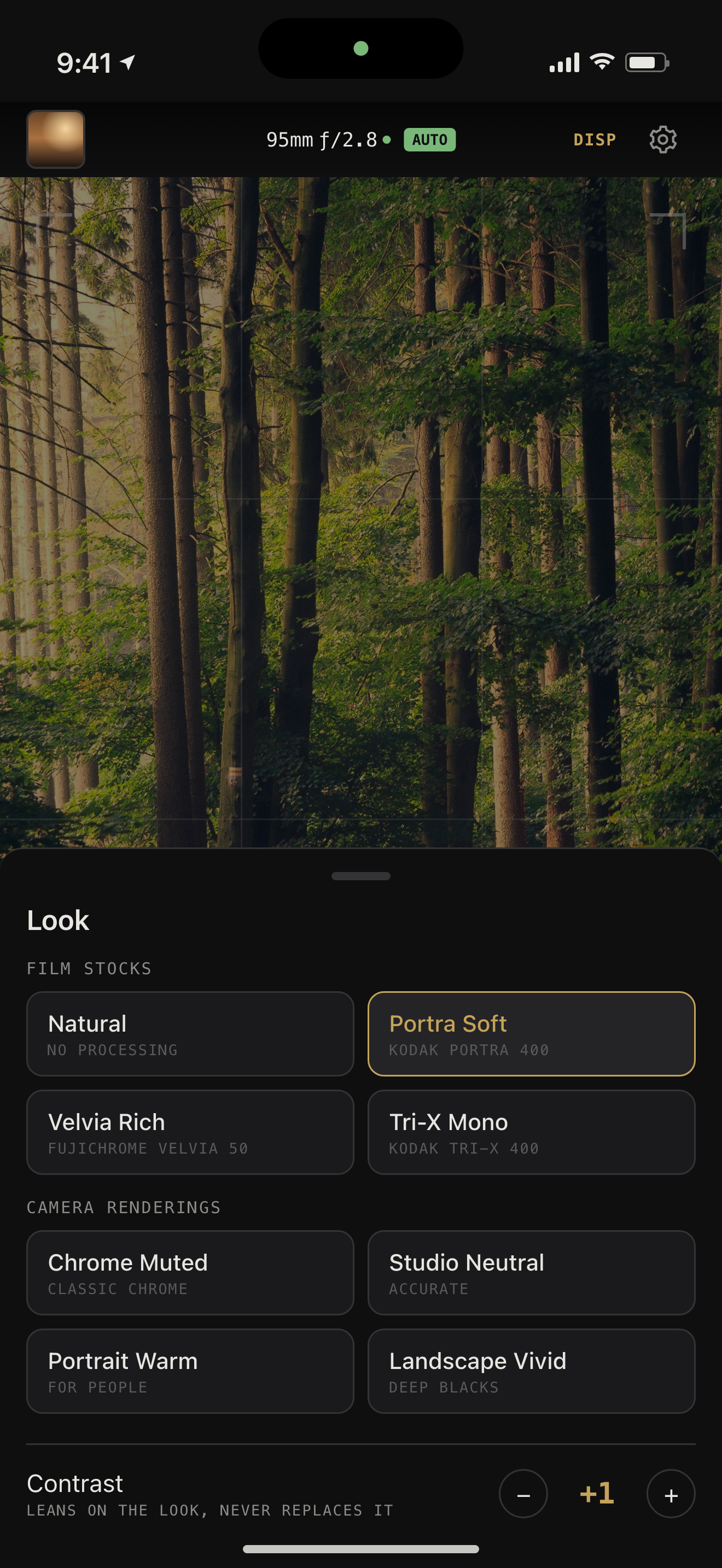
Nine, in two families that mean different things.
You see the look in the viewfinder, before the shutter. The live frames are drawn through the look's tone curve and colour cube, so black and white is something you compose in rather than discover afterwards.
Applied on top of the flat develop, never instead of it. Whichever look is chosen, the DNG is stored untouched — a look is a decision you can take back. Beside them sits a ±4 contrast that leans on the look rather than replacing it, and cannot clip or posterise whatever you do to it.
Film stocks
Imitating a particular film, grain and halation included.
- Naturaldefault
- Zero processing — the develop exactly as the sensor saw it
- Portra SoftKodak Portra 400
- Gentle contrast, a soft shoulder that never hits paper white, protected skin tones
- Velvia RichFujichrome Velvia 50
- Steep contrast, crushed blacks, heavy saturation, hard highlight clip
- Tri-X MonoKodak Tri-X 400
- Full-range black and white, coarse grain, warm halation glow
Camera renderings
The in-camera JPEG look people buy a particular body for. No grain, no halation.
- Chrome MutedFujifilm Classic Chrome
- Documentary: colour well back, reds especially, cool matte shadows
- Studio NeutralSony
- Accurate rather than flattering — the reference the others are judged against
- Portrait WarmCanon
- Warm midtones, gentle contrast, skin left alone rather than corrected
- Landscape VividNikon
- Deep blacks, strong greens and skies, skin held back so faces stay natural
Named for what they do, not who makes them. The references are documentation, not branding — nothing in the app carries a manufacturer's trademark.
Long exposure
Night, built out of seconds.
iOS will not hold a shutter open past one second for any third-party camera app, on any iPhone. A night exposure cannot be asked for — so it is built, from 2 to 32 frames.
Adds the light up
Eight one-second frames become about eight seconds, and moving subjects trail the way they do on a real long exposure.
Throws the noise away
Random noise falls as √n while the signal stays put, so eight frames at ISO 12800 carry roughly the grain of ISO 1600.
Arithmetic you can check
Night Mode picks different pixels from different frames and runs a denoiser you cannot inspect or undo. This adds numbers together in linear light — what an observatory does.
It needs a tripod, because the frames are not aligned. The badge shows the frame count in gold throughout, so a stacked photograph is never mistaken for a single exposure.
The RAW
Kept, so the look is never a commitment.
Every shot stores its Bayer RAW — around 24 MB — as the alternate resource of the same photo asset as the developed HEIF. Re-develop any shot with any look, months later, and the original is left untouched.
A saved slot can turn that off to save space, and those shots can never be re-developed. It is the only irreversible setting in the app, which is why the badge turns red before the shutter rather than after.
What it does not do
Limitations, by design.
- 12 MP output. Native Bayer RAW resolution — the 48 MP path is fused with Apple's algorithms and is not reachable this way.
- Zoom past a lens's own framing costs resolution, because it is a crop of that 12 MP frame. Shoot the green ticks for the full frame.
- No single long exposure. iOS caps a third-party shutter at one second whatever the lens can do.
- Held focus does not survive a lens change. Lens position describes travel on the lens it was set against.
- No flash, no burst, no video.
How it is built
Written from the source, not around it.
The parts of this camera worth writing down are written down — real code from the app, and the reasoning that produced it. Start with the circular arcs that carry shutter speed, ISO and focal length, or with what Bayer RAW actually buys you on an iPhone.
Testing
Get the beta.
NaturalCam is on public TestFlight. It needs iOS 18 and an iPhone whose rear camera offers Bayer RAW — there is no camera in the simulator, so it cannot be tried on a Mac.